
What is Microsoft 365?
Microsoft 365 is a cloud-based suite of solutions that includes Exchange Online as the email and calendaring environment and collaborative office applications such as Office Web Apps, SharePoint, and Teams.
These services are available at an additional cost. Please discuss with your department's finance team if you are eligible for them.
A3 M365 Applications & Support - $47.60 per user/month
A3 M365 Exchange & Support - $19.45 per user/month
Microsoft 365 Copilot
Copilot adds AI assistance directly inside your Columbia Microsoft 365 account, helping you draft and revise in Word, analyze data in Excel, build slides in PowerPoint, summarize threads in Outlook, and recap meetings in Teams. Because it runs within Columbia's Microsoft tenant, Copilot only accesses content you already have permission to view, and your prompts and University data are not used to train Microsoft's AI models. Copilot may be used with sensitive but not HIPAA-regulated data in accordance with Columbia's data classification policies.
Office 365 Login & Multi-Factor Authentication
You can access your Microsoft 365 online applications with your [email protected] and UNI password. Only [email protected] will work for accessing Microsoft 365 applications, not your vanity email account (e.g., [email protected]).
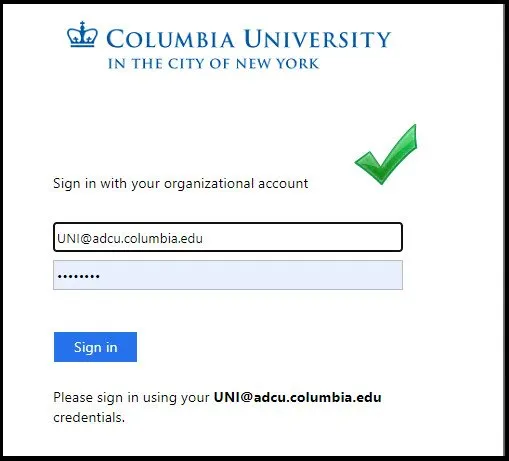
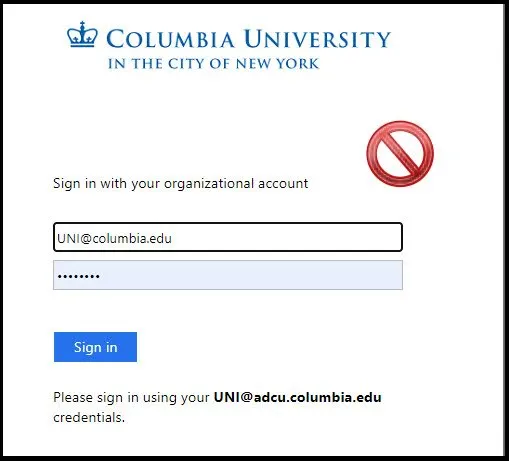
All Columbia University M365 users must log in to Microsoft 365 using multi-factor authentication (MFA). MFA increases account security by requiring multiple forms of verification to prove your identity when signing into an application. Visit CUIT's MFA page for more information, set-up instructions, and frequently asked questions about MFA.







Benefits
- Mobility: Work from virtually anywhere using trusted Office applications across your favorite devices (Windows, macOS, and mobile devices). You can seamlessly move and work with your Office documents locally on your device or online.
- Collaboration: Collaborate with teammates, partners, and customers with documents that are always up to date and accessible from almost anywhere.
- Communication: Microsoft Teams serves your communication needs, making it easy to see when someone is available, connect via instant message, audio or video calls, and host online meetings.
- Content Management: SharePoint Online makes it easy to set up and manage online communities, wikis, and blogs, create customized forms, and create and manage content and documents.
- Exchange Online: Access email and calendars on the go and keep everyone in sync with enterprise-grade email and shared calendars. You get up to 100GB of email storage.
FAQs
Microsoft 365 provides access to online versions of products including Word, Excel, PowerPoint and OneNote. You don't need to download anything to use these services. Microsoft 365 provides access to online versions of products including Word, Excel, PowerPoint and OneNote. You don't need to download anything to use these services.
Columbia University faculty, students, and staff are required to log in to Microsoft 365 using Multi-factor authentication. Multi-factor authentication (MFA) increases account security by requiring multiple forms of verification to prove your identity when signing into an application. Visit CUIT's MFA page for more information, set up instructions, and frequently asked questions about MFA.
Most modern web browsers are supported in Microsoft 365 including Windows Internet Explorer, Mozilla Firefox, Apple Safari and Google Chrome. This website has more information about the browser version you must use.
Yes. There are mobile versions of Microsoft 365 services available for Windows, iPhone and Android. The Microsoft Products page has more information about mobile versions of Microsoft 365.
For the latest updated information regarding Microsoft 365 known issues and workarounds please visit Microsoft's Fixes and Workarounds page.
Eligible Columbia University faculty, staff, and students can download the latest versions of Microsoft 365 software at no additional cost. All available applications (dependent on the device) may be installed on up to 5 devices. The desktop applications are available for download using your [email protected] and University Password on the Microsoft 365 Software page (Windows and macOS only).
For more details, see Microsoft Downloads for personal desktops and laptops.
The use of Microsoft 365 Copilot and Microsoft 365 Copilot Chat, as used by organizations, is covered by the terms of the Microsoft Products and Services Data Protection Addendum (DPA) and Microsoft Product Terms, with Microsoft acting as a data processor.
Enterprise data protection (EDP) refers to controls[1] and commitments, under the Data Protection Addendum (DPA) and Product Terms, that apply to customer data for users of Microsoft 365 Copilot and Microsoft 365 Copilot Chat. The use of the term EDP isn't meant to limit the benefits offered under the DPA and Product Terms.